Ai Strategy for Workflow Acceleration
Project Summary
As the integration of AI becomes central to the Software Development Life Cycle (SDLC), I led the effort to evolve our proprietary AI Agent into a proactive workflow accelerator. By integrating document processing and contextual “just-in-time” prompts, we transformed the user experience from manual data entry to high-level oversight.
Building on my previous work of Standardizing the UX Process, I understood the importance of ensuring this AI integration was not a “black box” for new users. Instead, it followed a scalable, transparent framework that aligned with our long-term business goals and technical roadmap.
Problem
Context
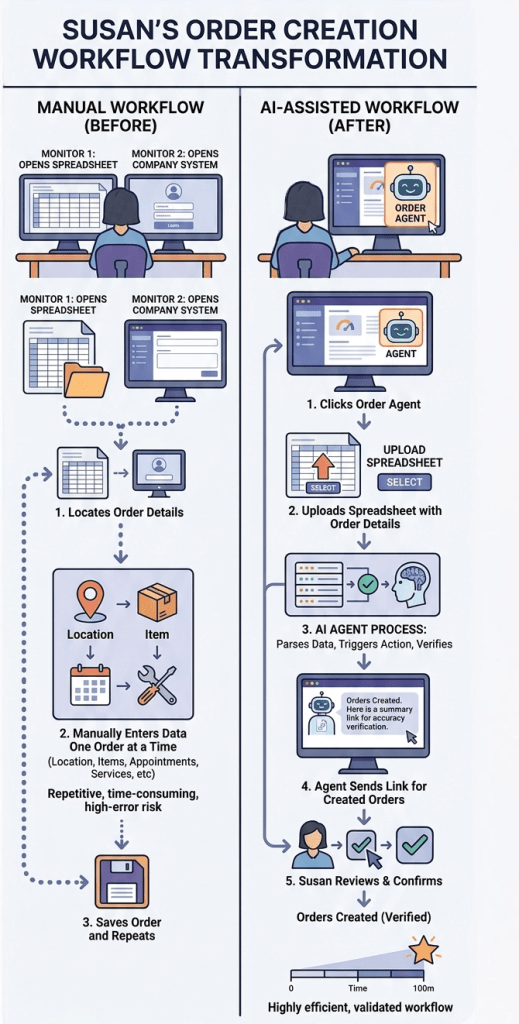
Our Customer Experience (CX) teams were bogged down by high-volume, repetitive manual tasks. A primary bottleneck was order creation: reps received bulk data via spreadsheets but were required to manually transcribe that information into our internal systems—a process prone to human error and significant time loss.
Research Methods
- Competitive Analysis: Partnered with Researcher John Coker to evaluate industry standards for AI-driven document parsing and agentic workflows.
- User Shadowing: Observed “Susan,” a CX Representative, to map the friction points of manual order entry and identify where “just-in-time” knowledge prompts could reduce training overhead.
- Requirement Validation: Acted as BA to translate complex technical AI capabilities into functional business requirements.
Research Findings
- Transcription Fatigue: High-volume manual entry led to increased errors in Reference numbers and Item services.
- Knowledge Gaps: New CX reps frequently paused workflows to search for information, highlighting a need for in-page knowledge prompts.
- Trust Barriers: Users were hesitant to use AI unless they could see a clear “verification step” before final submission.
Solution
My Approach
Document Processing: Enabled Susan to upload a spreadsheet directly. The Agent parses the data and prepares the “Create Order” action for her approval.
Agentic Action Triggers: Shifted the Agent from a “reply-only” tool to an “action-oriented” partner. The Agent now suggests the next logical step based on the uploaded file.
In-Page Knowledge Prompts: To decrease onboarding time and maintain the high standards our customers expect, we implemented contextual prompts. This provides “just-in-time” info to Susan, reducing the need for external documentation and ensuring the “Black Box” of AI is always explainable.
Collaboration
I led the cross-functional team by aligning technical feasibility with user needs. I collaborated closely with a UX Designer to refine the UI components and partnered with Researcher John Coker to ensure our research-backed findings were integrated into the final Agent behavior.
I acted as the primary driver for the project’s functional requirements. I collaborated closely with our Product Manager, who provided the North Star direction and managed the broader roadmap, ensuring our strategy was tethered to the company’s long-term AI evolution.
Cross-Functional Alignment: Through tight collaboration between myself, the UX designer, UX Researcher, and the PDM we delivered a product that met immediate user needs while staying true to our North Star.
Process
- Conducted industry research to ensure our strategy aligned with what users will experience in Ai workflows elsewhere.
- Conducted time on task tests to set a base-line to provide clear OKRs.
- Collaborated with Expert Developers on early designs to ensure feasibility.
- Conducted usability testing leveraging Figma Make to efficiently provide a realistic environment for users to evaluate the workflow.
- By automating the data-entry phase of order creation, we reduced the time-to-task completion for CX Reps, allowing them to focus on complex problem-solving rather than manual transcription.
AI Agent Integration & Workflow Map